
FileWave
Install Software on Your LPS Windows Computer
Self-Serve Software
In an effort to get the right software to the right staff members, LPS offers a way to install your own software, on your LPS Windows computer, using a tool called FileWave. The software available through this tool is curated by Lincoln Public Schools. You will only see the software that LPS makes available to optionally install on your LPS laptop.
Launch FileWave
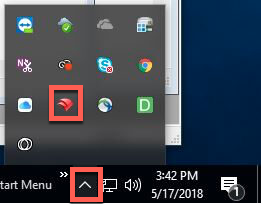
On Windows, click the up arrow of the system tray to view the FileWave icon.
Installing New Software
- Click the “Install” button beside the software title you wish to install. You will see indicators that the software is installing.
- Certain software will require a license code upon first run. Seeing a title in this list does not ensure that you have a license to legally use the software in question. Unless you have received other instructions, contact the Help Desk for assistance in acquiring license codes, or determining whether you qualify for one based upon your role or location.
Operating System Updates
Before installing make sure that:
- Any important files on your computer are backed up elsewhere. ( LPS Google Drive, etc.)
- Your computer is plugged in to power.
- You have at least an hour where you will not need your computer.
If you have any questions, feel free to contact the LPS Help Desk before beginning.
Updating Existing Software
Software Updates are pushed to all LPS devices. The length of time required to run the updates will vary. A restart will be required after each.
During the update window, you’ll see a dialog box appear, notifying you important software updates can now be installed. You have the option to delay this update for short periods of time.
Uninstalling (Removing) Software
FileWave can also be used to UNINSTALL software that was originally installed using the same tool.
- Find the software you wish to remove from the list of titles available.
- Click the Uninstall button.
- The app will be removed from your computer.

You must be logged in to post a comment.